
- Core Identity: Clipchamp is a browser-based video editor acquired by Microsoft, known for its simple, drag-and-drop interface and integration with Windows 11.
- Key Features: It offers essential features like a simple timeline editor, AI captions, a stock library, and templates optimized for various social media platforms. The free plan allows for 1080p exports.
- Target Audience: It is best suited for beginners, casual creators, and social media managers who need quick edits and are already within the Microsoft 365 ecosystem.
- Performance and Usability: The tool is praised for being beginner-friendly and running smoothly on modern browsers for short videos. Its AI caption generation is fast and mostly accurate.
- Limitations: It lacks advanced editing features for professional users and can experience browser lag on larger, more complex projects. Some stock assets require a paid subscription.
- Conclusion: Clipchamp is a solid, free, and easy-to-use option for basic video editing, especially for Windows users, but it is not a replacement for more advanced, cinematic editing software. The Premium plan unlocks 4K exports and a full stock library.
Finally, we’ve got Clipchamp, a tool that’s been making waves with both casual creators and professionals. In this Clipchamp Review, we break down the 9th standout tool in our lineup.
In this Clipchamp Review, I will break down its features, AI capabilities, pricing, performance, and how it compares to other top editors like VEED.io and Submagic.
What is Clipchamp? (Overview)
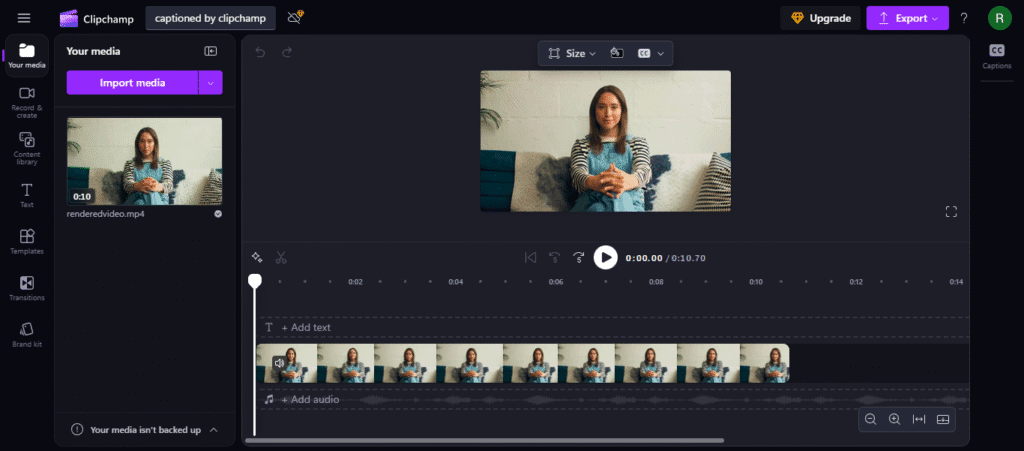
Clipchamp is a browser-based video editor acquired by Microsoft in 2021. It’s a very Simple Dashboard. It integrates directly with Windows 11, enabling you to create, edit, and share videos without the need for heavy software installation.
Tip: If you are interested in more advanced AI caption generator tools, check this blogpost 10 Best AI Caption Generator Tools.
Clipchamp Features – What You Get
What makes Clipchamp stand out:
| Feature | Details |
|---|---|
| Drag-and-drop editor | Simple timeline interface. |
| Templates | Ready-made designs for YouTube, TikTok, Instagram. |
| AI captions | Auto-generate and edit captions. |
| Stock library | Free & premium assets. |
| Cloud sync | Files saved to OneDrive. |
| Export options | Up to 1080p (free) or 4K (paid). |
Related: Learn how AI tools like Submajic compare in caption accuracy.
Pricing – Free vs Paid Plans
Clipchamp offers a Free plan with essential features and a Premium plan at $11.99/month for:
- 4K exports
- Premium stock library
- Brand kit
- Content backup
✅ Best for: Microsoft 365 subscribers, as Clipchamp Premium is often included.
Performance & Ease of Use
Clipchamp runs smoothly on modern browsers. For short videos (under 5 minutes), it’s quick and responsive. Longer edits with many layers may cause delays, especially on low-RAM laptops.
Beginners Guide
Captions Generated by ClipChamp
My experience with Clipchamp was great, the captions were generated in seconds and were almost all accurate. The website is fast too. There was just one small word error, but I quickly fixed it in the text editor within seconds.
Pros & Cons
Pros:
- Beginner-friendly interface.
- AI captions & templates speed up workflow.
- Integrated with Windows 11.
- No heavy downloads needed.
Cons:
- Limited advanced editing features.
- Occasional browser lag on big projects.
- Some stock assets require payment.
7. Clipchamp vs Competitors
| Tool | Best For | Key Advantage |
|---|---|---|
| Clipchamp | Windows users, casual creators | Free 1080p export |
| VEED.io | Social media editors | Advanced AI captions |
| Submagic | Short-form creators | AI-driven engagement features |
| Canva Video | Quick brand content | Integrated design tools |
8. Who Should Use Clipchamp?
- Beginner YouTubers
- Social media managers needing quick edits
- Microsoft 365 users wanting value-added tools
If you’re an advanced editor, you may find Clipchamp too limited — but as a quick-edit solution, it’s a winner.
9. Final Verdict – Is Clipchamp Worth It?
Yes, if: you’re looking for a free, easy-to-use editor with basic AI features.
No, if: you need advanced cinematic editing tools.
Clipchamp is a solid choice for casual creators, especially if you’re already in the Microsoft ecosystem.